12345678910111213141516171819202122232425262728293031323334353637383940414243444546474849505152535455 |
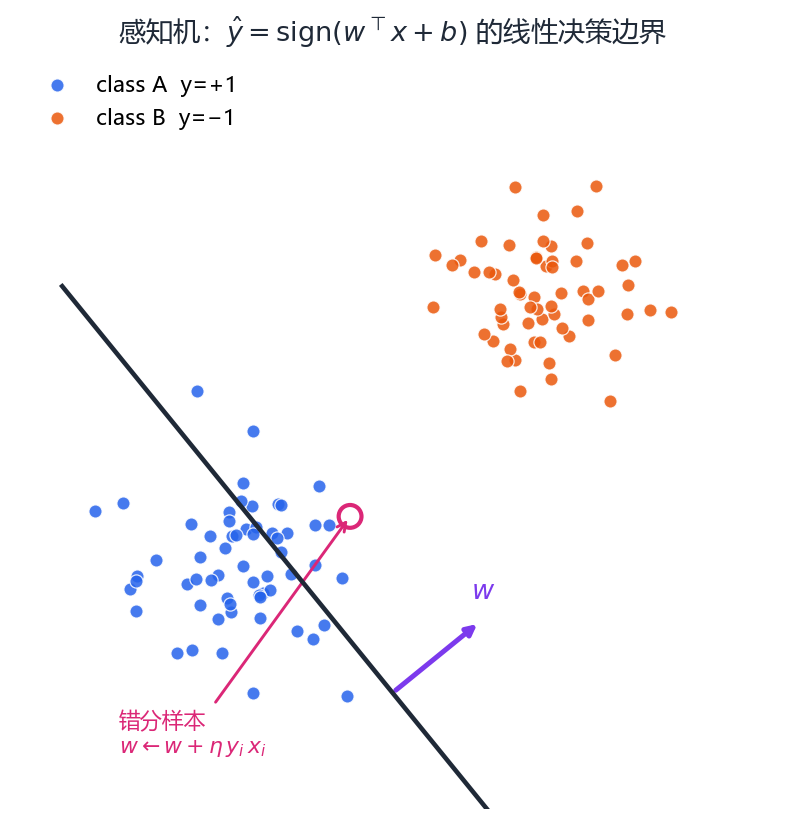
"""演示15: 感知机/全连接 — 从"原子"到线性分类。

生成两簇线性可分数据, 手写感知机学习规则 w += lr·y·x 训练,
画出决策边界, 对比感知机(硬阈值)与逻辑回归(软概率)决策边界。
"""
import os
import numpy as np
import matplotlib.pyplot as plt
from figure_style import figures_dir, configure

configure()

OUT = figures_dir()
os.makedirs(OUT, exist_ok=True)

rng = np.random.default_rng(0)
# 两簇数据: 类 +1 与 -1
X = np.vstack([rng.normal([-2, 0], 0.8, (50, 2)),
               rng.normal([2, 0], 0.8, (50, 2))])
y = np.array([1] * 50 + [-1] * 50)

# ---- 感知机学习规则 (硬阈值) ----
w = np.zeros(3)                                   # 权重 + 偏置(w0, w1, w2)
Xh = np.hstack([np.ones((len(X), 1)), X])         # 增广齐次坐标
for _ in range(200):
    mis = Xh[y * (Xh @ w) <= 0]                   # 错分样本
    if len(mis) == 0:
        break
    # 每个错分样本做一次 w += lr·y·x
    for xi, yi in zip(Xh, y):
        if yi * (xi @ w) <= 0:
            w = w + 0.1 * yi * xi

# ---- 逻辑回归(软概率, sklearn) ----
from sklearn.linear_model import LogisticRegression
clf = LogisticRegression().fit(X, y)

xx = np.linspace(-5, 5, 200)
# 感知机边界: w1*x + w2*y + w0 = 0
yy_p = -(w[1] * xx + w[0]) / w[2]
# 逻辑回归边界: coef0*x + coef1*y + intercept = 0
yy_l = -(clf.coef_[0, 0] * xx + clf.intercept_[0]) / clf.coef_[0, 1]

fig, ax = plt.subplots(figsize=(8, 6))
ax.scatter(X[y == 1, 0], X[y == 1, 1], c="tab:blue", label="类 +1")
ax.scatter(X[y == -1, 0], X[y == -1, 1], c="tab:orange", label="类 -1")
ax.plot(xx, yy_p, "g-", lw=2, label=f"感知机边界 (w={w[1]:.2f}, b={w[0]:.2f})")
ax.plot(xx, yy_l, "r--", lw=2, label="逻辑回归边界")
ax.set_title("感知机学习规则: w ← w + lr·y·x (错分样本驱动)")
ax.legend(); ax.grid(alpha=0.3); ax.set_aspect("equal")
fig.tight_layout()
out = os.path.join(OUT, "fig_ai_perceptron.png")
fig.savefig(out, dpi=150)
print(f"感知机权重 w = {w} -> {out}")
|